CS 255 System Design Document
UML Diagrams
UML Use Case Diagram
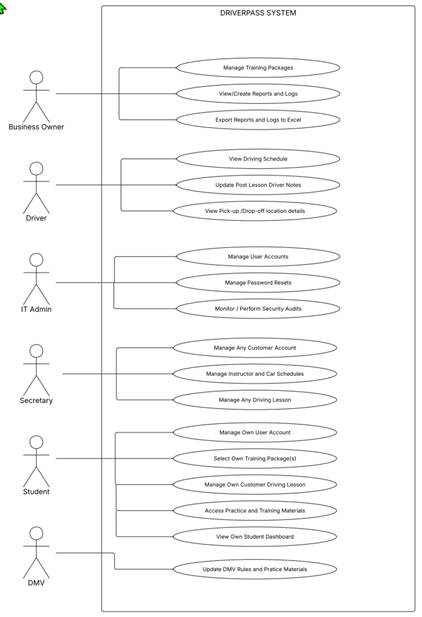
Figure 1- Use Case diagram
UML Activity Diagrams
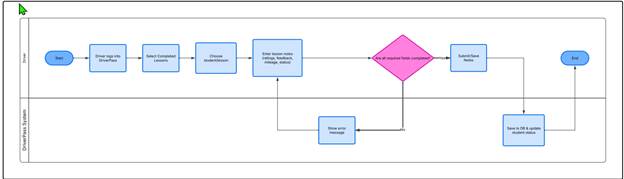
Figure 2 -Post lesson Notes update activity diagram
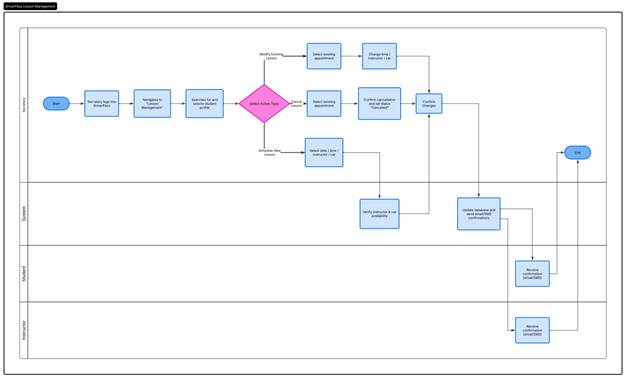
Figure 3 -Manage any driving lesson Activity diagram
UML Sequence Diagram
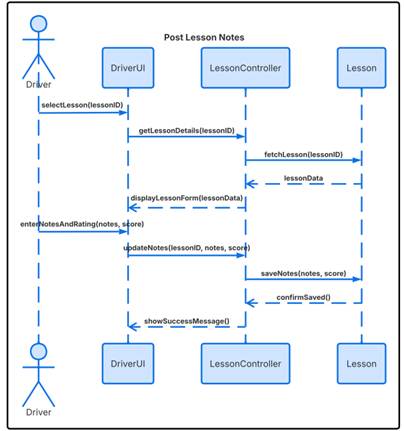
Figure 4 - Post Lesson Notes Sequence Diagram
UML Class Diagram
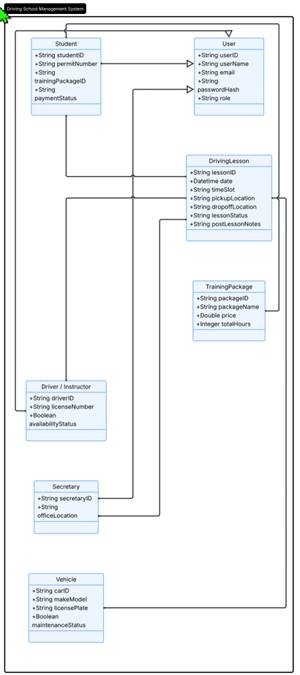
Figure 5 - UML Class Diagram
Technical Requirements
This section outlines the technical infrastructure, hardware, software, and development tools required to support the DriverPass system. These technical specifications outline requirements to keep the application secure, scalable, and responsive across all user roles. By defining these requirements upfront, development teams have the blueprints to build a system that meets that meets the needs of DriverPass.
Technical Requirements for DriverPass System
1. Hardware Requirements
- Cloud-hosted virtual servers
- Containing scalable CPU and RAM to support multi-user load.
- Client Devices:
- Mobile devices (smartphones/tablets with cellular or Wi-Fi connectivity)
- Drivers: used to log post-lesson notes on-the-go, communicate with students and route to pickup locations.
- Desktop or laptop computers
- Secretaries and IT Admins: used to manage schedules, user accounts, and security audits.
- Web-enabled devices (desktops, laptops, smartphones)
- Students: used to view dashboards and training materials.
2. Software Requirements
- Operating System:
- Server
- Linux for robust security, stability, and scalability.
- Client
- Cross-platform web browser support (Chrome, Safari, Edge, Firefox) across iOS, Android, Windows, and macOS.
- Database Management System:
- Relational Database System to manage structured entities like User, Student, Driver, DrivingLesson, TrainingPackage, and Vehicle.
- Application Framework:
- Enterprise web framework to implement core controllers and RESTful APIs connecting the user interfaces with the database.
3. Tools and Third-Party Services
- Design & CASE Tools:
- Lucidchart (used for system modeling and UML diagram creation).
- Notification API:
- Integration with automated SMS/Email gateways to send lesson booking confirmations and schedule updates to students and instructors.
- Reporting Tools:
- Spreadsheet export library enabling business owners to export logs and reports to Microsoft Excel.
4. Infrastructure & Security
- Security & Authentication:
- HTTPS/TLS encryption for all data in transit.
- Encryption at rest for database records containing sensitive customer and permit data.
- Role-Based Access Control (RBAC) to enforce security boundaries between roles
- Backup & Monitoring:
- Automated daily database backups with point-in-time recovery and security monitoring tools for IT audit logging.